Design feedback
Design feedback that points at the pixel, not the paragraph
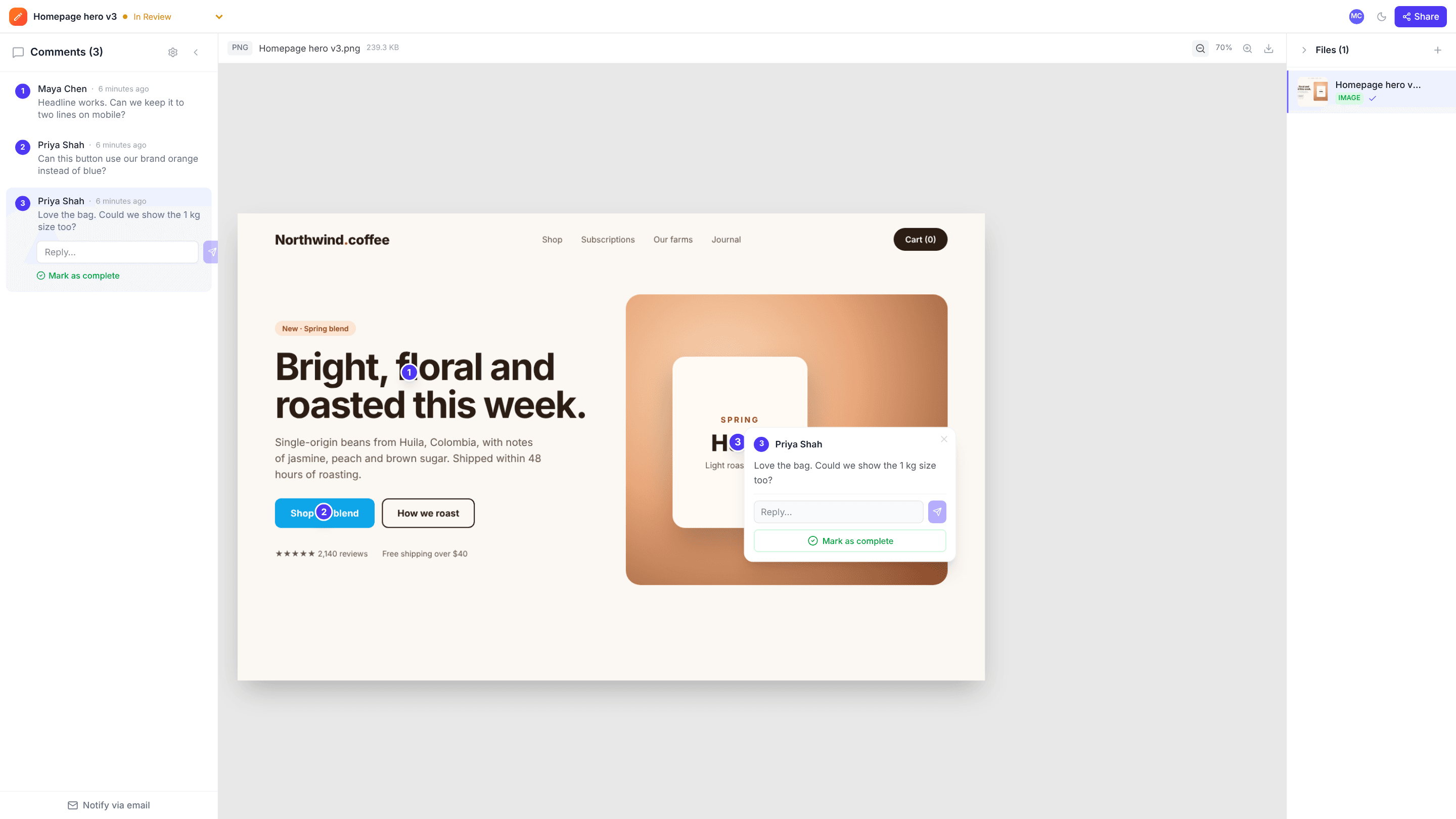
Drop in a mockup, logo, banner or screenshot. Reviewers click the exact spot and type what needs to change, so “make the thing on the left bigger” becomes a numbered pin you can act on.
Works with PNG, JPEG, WebP and SVG · Free plan, no credit card
How it works
- 1
Upload your designs
Drag in one image or a whole set of screens. Each file becomes an artboard in the project.
- 2
Click where it matters
Click any spot to drop a numbered pin and write the note. Zoom in for detail work.
- 3
Share with the client
Send a review link. Clients comment as guests, and every note lands in one list.
Why teams use edits.io for design feedback
Pins that stay put
Pins are stored relative to the image, so they stay on the right spot at any zoom level and on any screen size.
A whole flow in one project
Upload every screen of a flow and switch between them from the file list. Each artboard keeps its own comments.
Clients don’t need an account
Share a link with view or comment access. Reviewers type their name and start clicking.
Discuss, then resolve
Reply under any pin to talk it through, then resolve it once the change is in. Open pins are your revision list.
See who’s looking
Live avatars show who else has the project open, and new comments appear for everyone instantly.
Approve when it’s done
Set the project to Approved or Changes Requested so the whole team knows where the design stands.
Frequently asked questions
Which image formats are supported?+
PNG, JPEG, WebP and SVG. You can also add PDFs, videos and website captures to the same workspace.
Do pins move if someone zooms in?+
No. Each pin’s position is stored as a percentage of the image’s width and height, so it lands on the same spot at every zoom level and screen size.
Can I review several screens together?+
Yes. A project can hold many files. They appear as a numbered list next to the canvas, and each one has its own comments.
Can clients comment without signing up?+
Yes. Share a link with comment access and they can leave feedback as a guest under their name.
Can I control what a link allows?+
Yes. A link can be view-only or allow comments, and you can turn it off at any time.
Is edits.io free?+
Yes. The free plan includes 3 GB of storage and 10 projects, with no credit card and no time limit. Pro is $19 a month and adds 250 GB of storage, unlimited projects and unlimited teammates.
Try it on your next review
Free for 10 projects and 3 GB of storage. Reviewers never need an account.
Create a free account