Website feedback
Collect feedback on any website, without installing anything
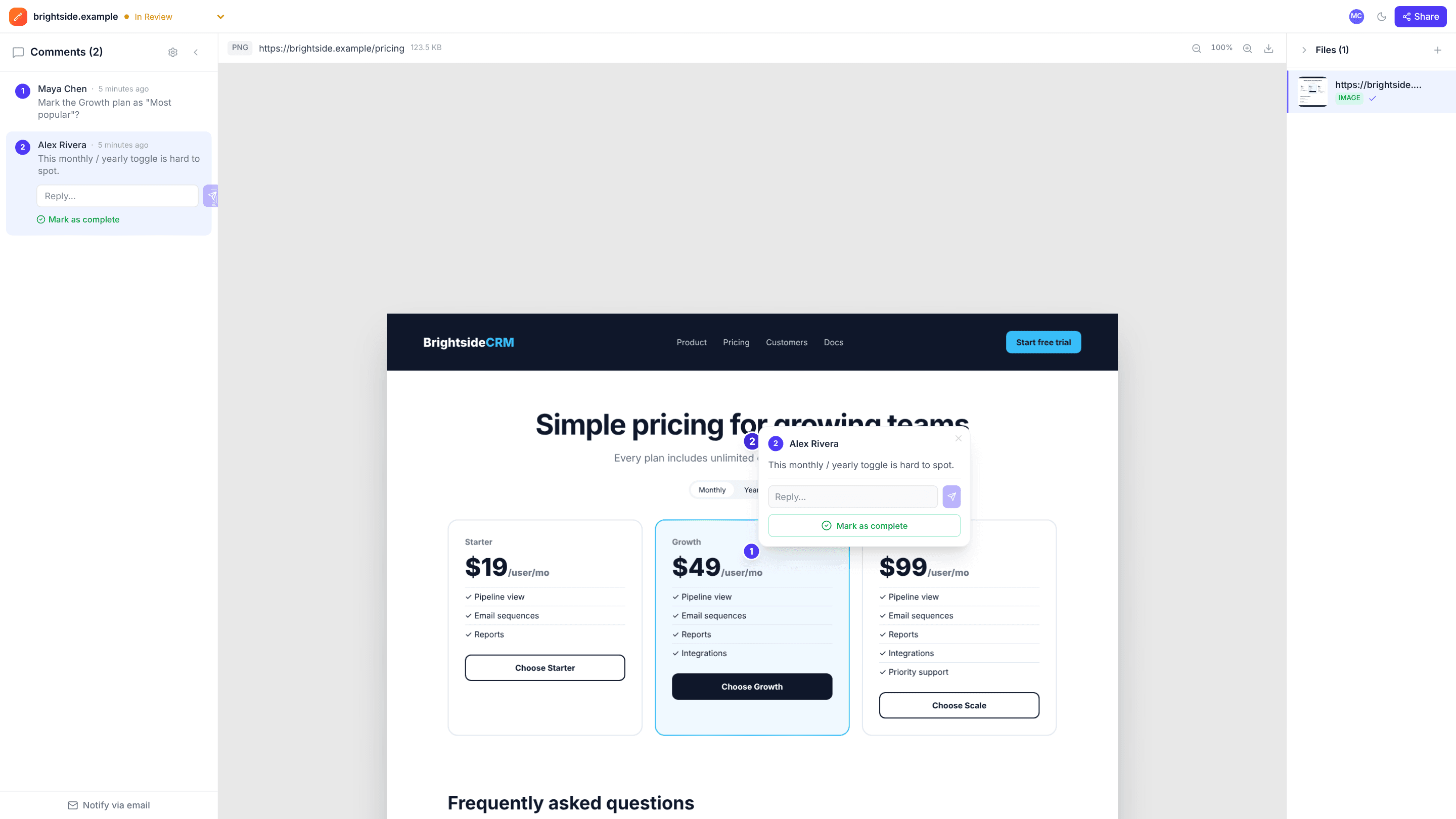
Paste a URL and edits.io captures the whole page, top to bottom. Your team and clients click directly on the capture to point at the header that’s too tall or the button that’s off-brand.
Works with any public web page · Free plan, no credit card
How it works
- 1
Paste a URL
Enter the address of a live page on your dashboard. edits.io captures it in full at desktop size.
- 2
Click to comment
Scroll the capture and click anywhere to leave a numbered pin with your note.
- 3
Share the review
Send a link so clients can add their own comments, without an account or a browser extension.
Why teams use edits.io for website feedback
The full page, not just the screen
The capture runs the whole length of the page, so feedback on the footer is as easy as feedback on the hero.
Nothing to install
No script on the site and no extension in the browser. If a page is public, you can review it, including competitor pages you want to reference.
Feedback on a fixed version
Comments stay attached to the capture you reviewed, even after the live site changes. Capture the page again for the next round.
Clients comment as guests
Reviewers open the link, add their name and start pointing at things. Nobody needs a login.
Threads and resolve
Discuss each pin in a thread and mark it resolved once it’s fixed, so you can see what’s left at a glance.
Next to the designs
Keep the live page in your workspace alongside mockups, PDFs and videos for the same project.
Frequently asked questions
Can I capture pages behind a login?+
No. Pages are captured by our server, which sees what a logged-out visitor sees. For signed-in screens, take a screenshot and upload it as an image instead.
What screen size is the capture?+
Pages are captured at a desktop viewport of 1440 × 900 pixels, at the full height of the page.
Do I need to add anything to my website?+
No. There is no script to install and no browser extension. You only need the page’s URL.
Can I review a staging site?+
Yes, if it’s reachable from the public internet over HTTPS. For security, addresses on private or internal networks are blocked.
What happens when the site changes?+
Your capture and its comments stay as they were. Capture the URL again to review the updated version.
Is edits.io free?+
Yes. The free plan includes 3 GB of storage and 10 projects, with no credit card and no time limit. Pro is $19 a month and adds 250 GB of storage, unlimited projects and unlimited teammates.
Try it on your next review
Free for 10 projects and 3 GB of storage. Reviewers never need an account.
Create a free account