Video review
Video feedback pinned to the exact moment and the exact spot
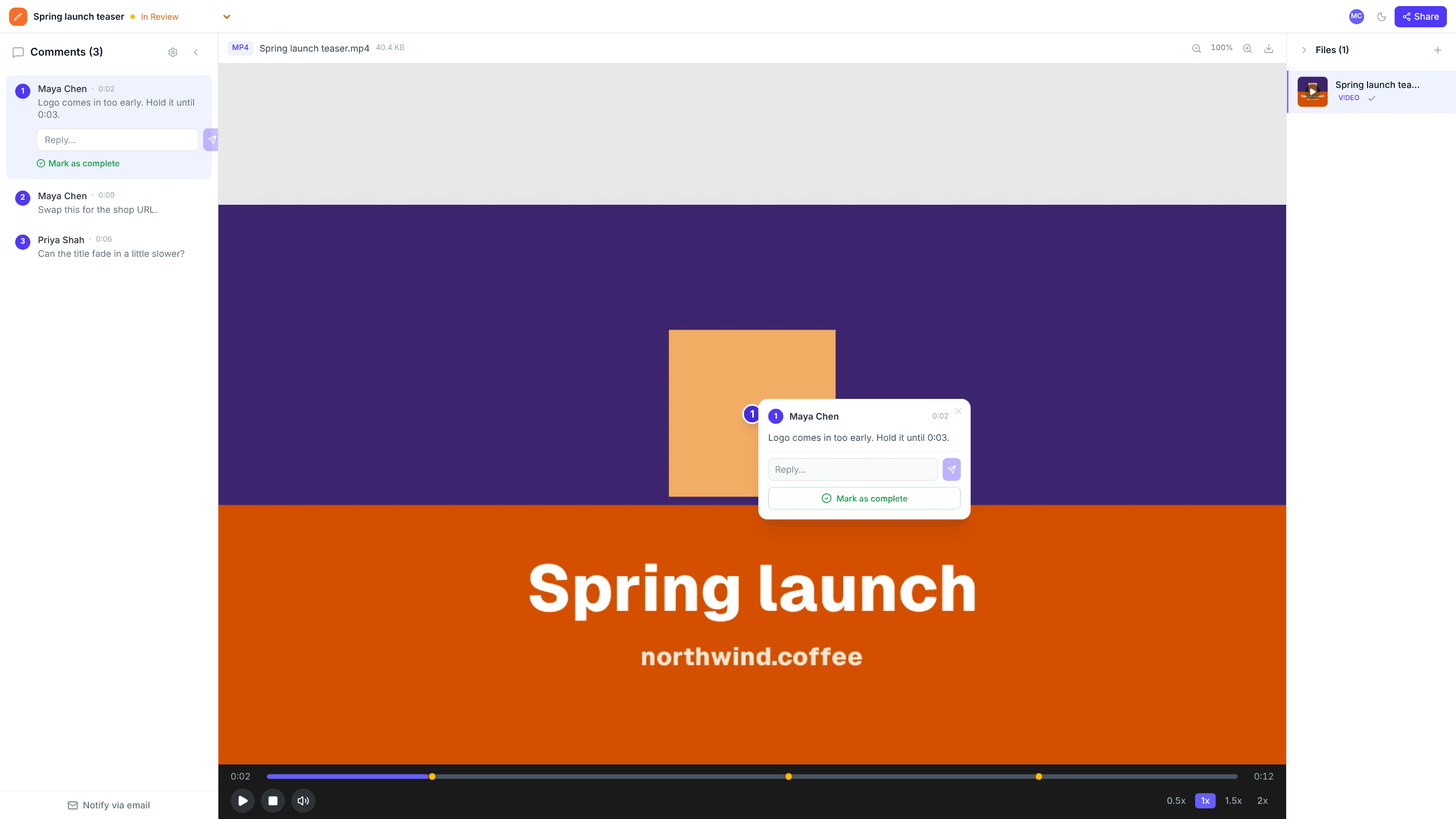
Reviewing video over email means hand-typed timestamps and vague notes like “the bit near the end”. With edits.io, reviewers pause, click on the frame, and the comment is saved with both its position and its timestamp.
Best with MP4 and WebM, up to 2 GB per file · Free plan, no credit card
How it works
- 1
Upload the cut
Drop an MP4 or WebM file onto your dashboard. It plays in the browser with a built-in timeline.
- 2
Pause and click
Stop on the frame that needs work and click the spot. The comment records where on the frame and when in the video.
- 3
Jump straight back
Click any comment and the player seeks to that moment, so the editor sees exactly what the reviewer saw.
Why teams use edits.io for video review
Timestamps recorded for you
Nobody has to type “1:42” into a comment. The time is saved automatically, down to the millisecond.
Position on the frame, too
Many review tools only tie a note to a time. Here each comment also marks the logo, caption or face it’s about.
Pins appear when they matter
A pin shows on the frame around the moment it was left, so the picture stays clear while the video plays.
Clients review without an account
Send a link and clients can watch and comment as guests, under their name.
Work through the list
Resolve each comment as you make the edit. What’s left open is your to-do list for the next cut.
Track where the cut stands
Mark the project In Review, Changes Requested or Approved so everyone knows whether it’s done.
Frequently asked questions
Which video formats work?+
MP4 (H.264) and WebM play in every modern browser, so they are the safest choice. Other video files can be uploaded, but whether they play depends on the reviewer’s browser.
Can reviewers point at part of the frame?+
Yes. Each comment is placed by clicking on the video, so it marks a position on the frame as well as the time.
What happens when I click a comment?+
The player jumps to the moment the comment was left, with the pin shown on the frame.
Do clients need an account to review?+
No. Anyone with a comment link can watch the video and leave feedback as a guest.
How large can video files be?+
Up to 2 GB per file. Your total storage is 3 GB on the free plan and 250 GB on Pro.
Is edits.io free?+
Yes. The free plan includes 3 GB of storage and 10 projects, with no credit card and no time limit. Pro is $19 a month and adds 250 GB of storage, unlimited projects and unlimited teammates.
Try it on your next review
Free for 10 projects and 3 GB of storage. Reviewers never need an account.
Create a free account